How to Create a Productive Accounting Office: 7 Steps to Optimize Your Workspace with the Right IT Infrastructure
Learn 7 steps to create a productive accounting office with smart workspace design, reliable IT infrastructure, efficient layouts, and better organization.

At OfficeMoods, we usually talk about layout, lighting, and the small details that make a workspace feel good to sit in every day. But for accounting professionals, a beautiful desk setup means little if the systems behind it are unreliable or unprotected. Tax season deadlines, client financial data, and audit trails all depend on infrastructure that most people never see, yet it shapes the mood of an office just as much as furniture does. A slow network or a security scare can undo every ergonomic chair and well-placed plant in the room.
This guide walks through the practical steps for building an accounting office that runs as smoothly as it looks. Many firms start this process by partnering with a managed IT services for accounting firms provider that understands the specific compliance and security demands of financial data. From there, the rest of the workspace, desks, storage, meeting areas, can be arranged around a technology backbone that actually supports the people using it, rather than working against them during the busiest weeks of the year.
Step 1: Assess Your Current IT Infrastructure and Security Gaps
Before rearranging a single filing cabinet or upgrading a monitor, take stock of what is already running in the background. This means mapping every device connected to your network, reviewing how client files move between staff, and identifying where backups actually live. Many small and mid-sized accounting practices discover during this step that outdated servers, unpatched software, or forgotten remote-access tools have been quietly creating vulnerabilities for years. A thorough assessment also reveals where employees have built informal workarounds, like emailing spreadsheets instead of using a secure portal, which often signals a gap between the tools provided and the tools people actually need.
This is also the moment to think about physical workspace alongside digital systems. Cable clutter, poorly placed server closets, and shared workstations without proper access controls all contribute to both security risk and daily friction. If your firm is renovating or redesigning a space during this process, thinking through cutting and layout details early, similar to the planning approach described in plan panel cuts for smarter home office projects, can help you avoid costly rework once cabling and equipment are already installed.
Step 2: Establish Compliance Requirements (IRS Security Six, WISP, FTC Safeguards Rule)
Accounting firms operate under a stack of regulatory expectations that many other small businesses never encounter. The IRS Security Six outlines baseline protections, including antivirus software, firewalls, multi-factor authentication, and encrypted backups, that tax preparers are expected to maintain. Beyond that, a Written Information Security Plan, or WISP, is now effectively mandatory for firms handling taxpayer data, and the FTC Safeguards Rule adds further obligations around how financial information is stored, transmitted, and disposed of. Skipping this step is not just risky, it can mean falling out of compliance with federal requirements tied directly to the ability to practice.
Documenting these requirements clearly gives your team a reference point when making technology decisions later in the process. Instead of guessing whether a new file-sharing tool meets the bar, staff can check it against a written policy that spells out encryption standards, access controls, and retention rules. This step also tends to surface conversations about staff training, since compliance is only as strong as the people following the procedures. Firms that treat this as a one-time checkbox rather than an ongoing responsibility often find themselves scrambling during an audit or, worse, after an incident has already occurred.
Step 3: Implement Core Security Controls and Data Protection Systems
With gaps identified and requirements documented, the next step is putting actual protections in place. This includes deploying endpoint detection tools, enforcing multi-factor authentication across every login, and setting up encrypted, automated backups that are tested regularly rather than assumed to work. Email filtering matters here too, since phishing remains one of the most common entry points into accounting systems, largely because tax season creates predictable, high-pressure moments when staff are more likely to click without thinking twice.
The financial stakes of skipping this step are significant. According to CPA Practice Advisor, professional services firms including accounting practices rank among the most targeted industries for cyberattacks, with breach costs averaging close to six million dollars, and nearly all accounting firms surveyed reported at least one attempted attack within the past year. Building layered defenses now, rather than reacting after a breach, is far less expensive and far less disruptive to client relationships that depend on trust.
Step 4: Deploy Managed IT Services and 24/7 Monitoring for Continuous Protection
Once core systems are in place, ongoing monitoring is what keeps them effective. Threats evolve constantly, and a firewall configured correctly today may need adjustment next month as new vulnerabilities emerge. Managed IT services provide continuous oversight, patching, and incident response without requiring in-house staff to become full-time cybersecurity experts. This frees accountants and administrative staff to focus on client work rather than troubleshooting network issues during a filing deadline.
The numbers below illustrate why continuous monitoring has become less of a luxury and more of a baseline expectation across the industry.
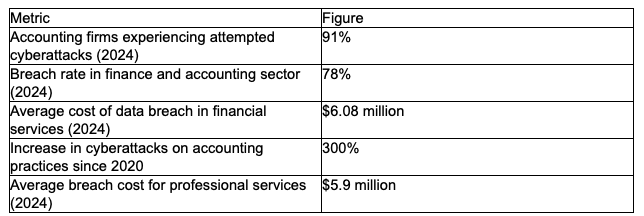
Taken together, these figures make a clear case for treating IT infrastructure as a core part of workspace design, not an afterthought handled once a year. A productive accounting office is one where staff trust the systems around them enough to focus on the numbers in front of them, rather than worrying about what might be lurking in the network. Pairing thoughtful physical layout with dependable, monitored technology creates an environment where both people and data are genuinely protected.
Stay up to date with our latest ideas!