A practical guide to electrical planning for office buildouts, with circuit math, panel clearance rules, conference room power and a pre-construction checklist that prevents costly changes.

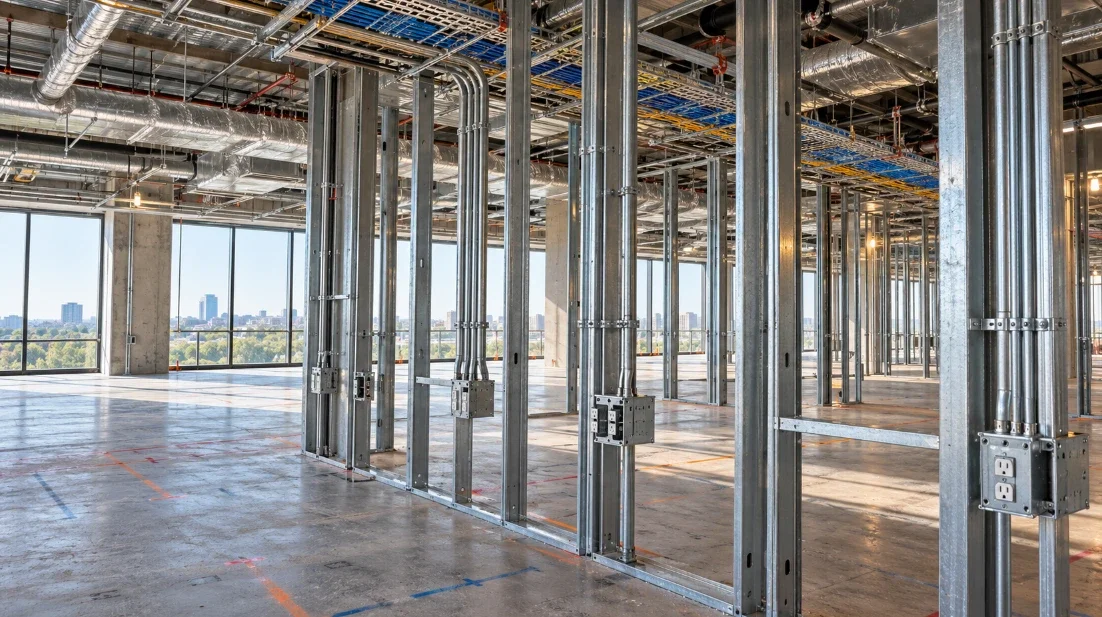
Ask anyone who's moved into a newly built office what they would change, and the answer rarely involves paint colors or chairs. It’s the outlet hidden behind a filing cabinet, the conference table with no nearby power, the printer running off an extension cord stretched across a walkway. Electrical design firms like SJS VDC, which plans and coordinates electrical systems for contractors, prevent this on large commercial projects by placing every outlet, panel and conduit run in a 3D model before construction starts, and the same thinking scales down nicely to a 4,000-square-foot office suite.
Below are the lessons that keep coming up in office buildouts, from desk power to the panel closet, plus a few numbers that make planning conversations with your contractor much easier.
Start With How People Will Actually Work
Electrical plans often fail when they're drawn before anyone has mapped a normal workday in the space. So walk through it first. Where do people sit, where do they meet, where does shared equipment live, and which areas will probably get rearranged within a year?
A sales team that hot-desks needs power at every seat. A design studio might need dual monitors, a large-format plotter and a rendering workstation that draws far more than a laptop. An accounting team with a scanner at every desk has different needs again.
Hybrid work changed the picture for meeting rooms. Many conference rooms now host video calls for most of the day, so each one needs power at the table for laptops, power at the wall for a display, and a sensible spot for a camera and speaker bar. A ceiling microphone may also need its own low-voltage cable running back to a network switch.
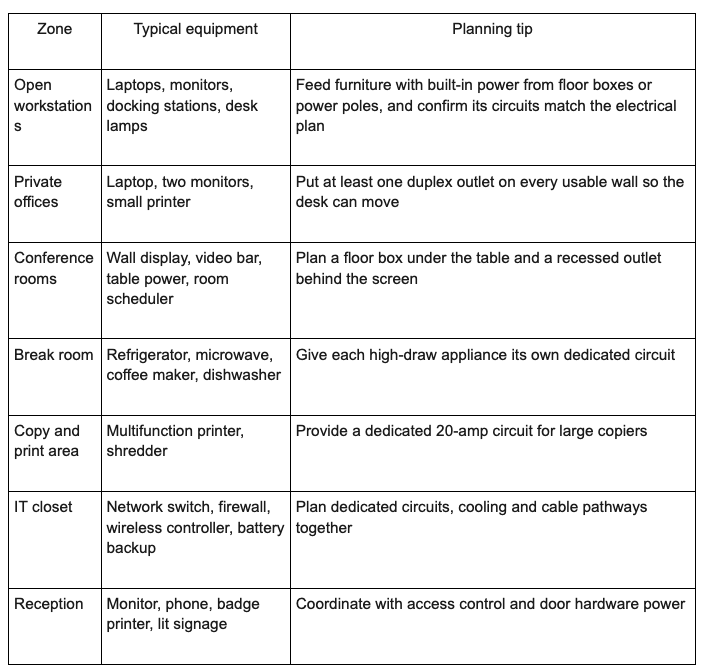
Map Power by Zone

Breaking the office into zones makes it much easier to spot gaps. Here’s how needs usually break down in a typical small or midsize office.
Do the Circuit Math Before the Walls Close
A standard 20-amp, 120-volt office circuit can deliver 2,400 watts on paper. Loads that run for three hours or more count as continuous under the National Electrical Code, which caps them at 80 percent of the breaker rating, or about 1,920 watts. That sounds generous until you add up a few real devices.
A coffee maker can pull 900 to 1,200 watts while brewing. Most microwaves draw 1,000 to 1,500 watts. A laser printer can spike past 1,000 watts as it warms up. Put those three on one circuit and the morning coffee run starts tripping a breaker, usually right before a client meeting. A space heater tucked under a desk adds about 1,500 watts and causes the same trouble every winter.
Ask your electrical designer for a panel schedule, which is a table listing every circuit, what it feeds and its estimated load. Honestly, it’s dull reading. It’s also the single document that shows whether the break room and the copy area share a circuit they shouldn’t.
Leave Room for the Panel

Electrical panels need clear working space under Section 110.26 of the National Electrical Code. For the voltages found in most offices, that means an area at least 30 inches wide, 6.5 feet high, and 3 feet deep in front of the panel. The space has to stay open permanently, so the storage closet that looked perfect for the panel can’t also hold shelving in front of it.
Spare capacity matters just as much. A panel with every breaker slot filled on opening day leaves nowhere to add circuits when the company hires, adds a server rack, or installs car chargers in the parking lot. A single Level 2 EV charger often needs its own 40-amp circuit, so a few chargers can take up a large share of a small panel.
Light the Room Around the Tasks
Lighting typically runs on circuits separate from outlets, and energy codes based on the IECC and ASHRAE 90.1 require automatic controls, such as occupancy or vacancy sensors, in many office spaces. Plan those sensors with the furniture layout in hand. A sensor mounted behind a tall partition can miss someone sitting still at a desk and switch the lights off mid-afternoon, a common complaint in open offices.
Conference rooms work best with separate lighting zones, so the area near the screen can dim during a video call while the table stays bright. Task lamps at desks, under-cabinet lights in the break room and lit signage at reception each need outlets or circuits of their own, and they are easy to forget until move-in week.
Keep Data and Power in Their Own Lanes
Every workstation needs data alongside power. Docks need network cable, the ceiling needs wireless access points, and cameras, badge readers and AV gear all need their own runs. Cabling standards such as ANSI/TIA-569 call for separating data pathways from power to limit interference, which in practice means separate raceways or divided compartments inside floor boxes.
Ceilings are where most conflicts hide. Cable tray, ductwork, sprinkler pipes, light fixtures and structural beams all compete for the same few feet of space. When each trade draws its own 2D plan, those collisions show up on site with a crew standing around waiting for a decision. When all the systems sit in one coordinated model, software flags the overlaps before anyone orders material. SJS VDC models electrical systems in Revit and runs clash detection for contractors on projects ranging from office buildings to major airports, and the logic holds up just as well for a single-floor tenant space.
The Pre-Construction Checklist
Before the electrical drawings are issued for construction, it pays to confirm a short list of decisions with your contractor and designer:
Desk positions locked in the furniture layout
Table power, display power and a cable path in every conference room
Dedicated circuits for the refrigerator, microwave, dishwasher and coffee equipment
Panel location with code-required clear space and spare breaker slots
An IT closet with dedicated circuits, cooling and a clear cable path to every zone
Agreed outlet heights for counters, wall-mounted displays and the reception desk
Lighting controls and occupancy sensors that meet your local energy code
A walkthrough of the 3D model or marked-up plans with the people who will use the space
What Changes Cost Once the Drywall Is Up
Moving an outlet in the drawings takes a designer a few minutes. Adding a standard outlet after the walls are finished commonly runs $150 to $300 per location, and the bill climbs once drywall patching, painting and permit time get added. Multiply that by a dozen forgotten spots, and a small oversight becomes a real line item.
Floor boxes are the expensive surprise. Adding one after the concrete slab is poured means core-drilling the slab, usually with a ground-penetrating radar scan first so the crew doesn’t cut rebar or post-tensioned cables. In a leased space, the landlord may also need to approve any work that touches the structure.
In finished offices, the workaround people reach for is a chain of power strips plugged into each other. OSHA has long warned against daisy-chaining power strips because it can overload the outlet feeding them, and fire inspectors look for exactly that setup during inspections.
Planning for the Office You’ll Have in Five Years
Offices get rearranged more often than almost any other building type. Teams grow, a meeting room becomes two phone booths, and an open area turns into team neighborhoods. A few inexpensive moves during construction keep those changes simple: empty conduits running from wall boxes up into the ceiling, a regular grid of floor boxes in open areas even if some stay capped at first, and roughly 20 to 25 percent spare breaker space in the panel.
Ask for the electrical model or the as-built drawings at handover too. During the next renovation, an electrician who can see exactly where every circuit runs finishes in hours, while one working blind spends days lifting ceiling tiles and tracing wires with a tone generator.
Stay up to date with our latest ideas!